簡單Socket Programming從0到1
Socket 為何?
- Socket 最早緣起於 Unix,而在 Unix 的檔案可以用
開啟open -> 讀寫write/read -> 關閉close的模式來操作,所以 Socket 在 Unix 當中也遵循這樣的操作模式,算是一種文件,Socket 所提供的 API 就是可以進行的操作(開啟/關閉、讀寫)。 - 使用 TCP/IP 協定的程式都是採用Socket來進行連接傳輸的介面,最常見的例子就是網頁瀏覽器,底層都是用 Socket 去做連接通信的介面。
Socket 架構圖解
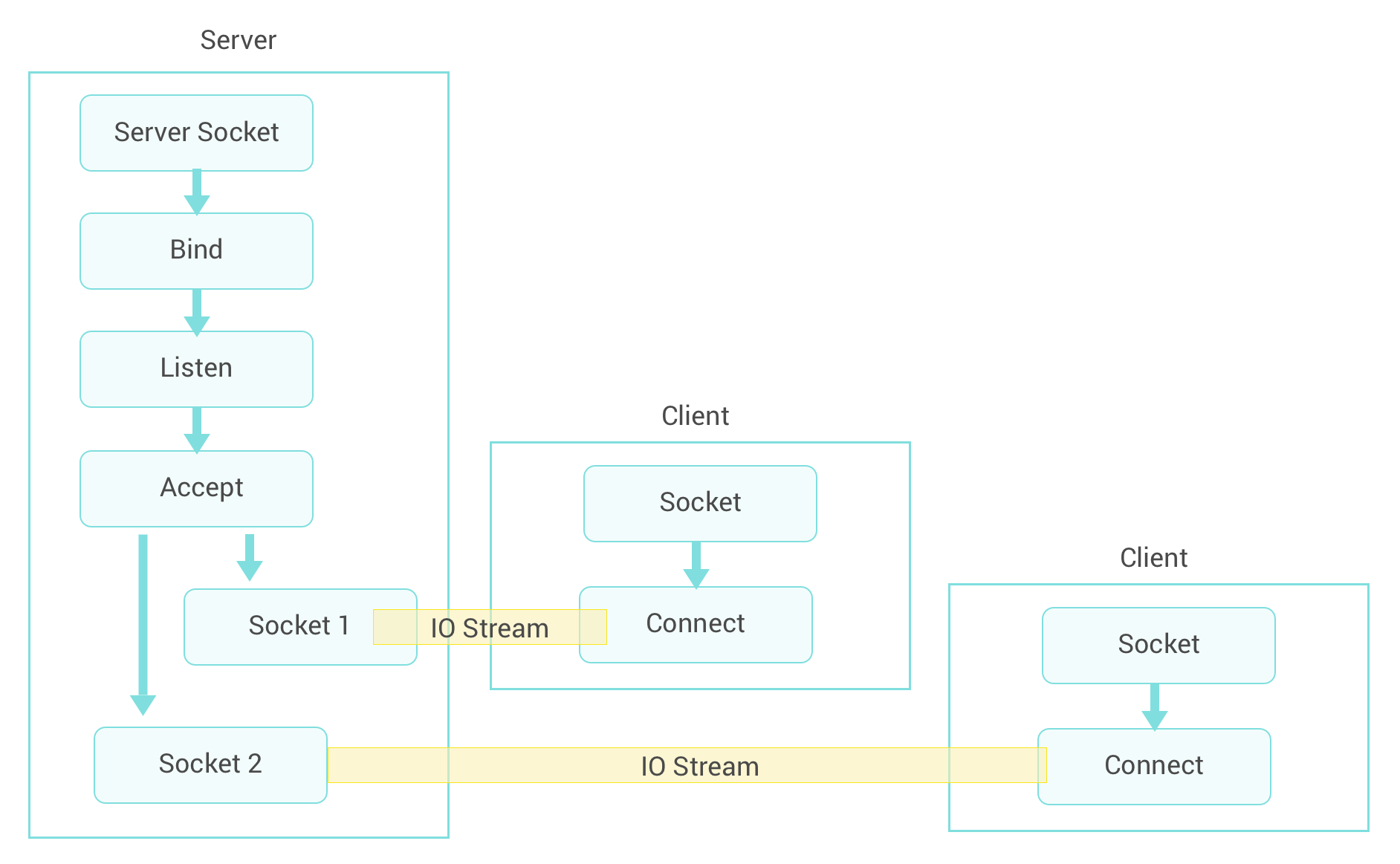
Java Socket API
簡單了解 Socket 為何後,接著就要來看在 Java 當中程式怎麼寫了。Socket Programming 採用 Server/Client(以下簡稱S/C架構)的架構來實作,所以下面列出幾個簡單觀念先了解後會更快上手:
- S/C架構下的程式進行通訊,Server 端需要提供一個固定位置(一個 IP:Port 或 Domain Name ),Client 要連接就要先知道這位置。
- 在 Java 當中 S/C 架構就是對應到
ServerSocket和Socket兩個物件,Server 端用ServerSocket.listen()來監聽 Client 端,Client 端用 Socket 和 Server 端做連接,Server端用ServerSocket.accept()來取得和 Client 端連線的 Socket 物件。 - 當 Server 和 Client 連接後,就可以用
socket.getInputStream()和socket.getOutputStream()來做資料的讀寫傳輸。 - 最後資料傳遞完後,記得要呼叫
socket.close()來關閉所有使用到的 Sockets。
程式實作
Server端
This file contains hidden or bidirectional Unicode text that may be interpreted or compiled differently than what appears below. To review, open the file in an editor that reveals hidden Unicode characters.
Learn more about bidirectional Unicode characters
| import java.io.DataInputStream; | |
| import java.io.DataOutputStream; | |
| import java.io.IOException; | |
| import java.net.ServerSocket; | |
| import java.net.Socket; | |
| import java.util.concurrent.ExecutorService; | |
| import java.util.concurrent.Executors; | |
| public class Server { | |
| public static final int LISTEN_PORT = 5987; | |
| public void listenRequest() { | |
| ServerSocket serverSocket = null; | |
| ExecutorService threadExecutor = Executors.newCachedThreadPool(); | |
| try { | |
| serverSocket = new ServerSocket(LISTEN_PORT); | |
| System.out.println("Server listening requests..."); | |
| while (true) { | |
| Socket socket = serverSocket.accept(); | |
| threadExecutor.execute(new RequestThread(socket)); | |
| } | |
| } | |
| catch (IOException e) { | |
| e.printStackTrace(); | |
| } | |
| finally { | |
| if (threadExecutor != null) | |
| threadExecutor.shutdown(); | |
| if (serverSocket != null) | |
| try { | |
| serverSocket.close(); | |
| } | |
| catch (IOException e) { | |
| e.printStackTrace(); | |
| } | |
| } | |
| } | |
| /** | |
| * @param args | |
| */ | |
| public static void main(String[] args) { | |
| Server server = new Server(); | |
| server.listenRequest(); | |
| } | |
| /** | |
| * 處理Client端的Request執行續。 | |
| */ | |
| class RequestThread implements Runnable { | |
| private Socket clientSocket; | |
| public RequestThread(Socket clientSocket) { | |
| this.clientSocket = clientSocket; | |
| } | |
| /* (non-Javadoc) | |
| * @see java.lang.Runnable#run() | |
| */ | |
| @Override | |
| public void run() { | |
| System.out.printf("有%s連線進來!\n", clientSocket.getRemoteSocketAddress()); | |
| DataInputStream input = null; | |
| DataOutputStream output = null; | |
| try { | |
| input = new DataInputStream(this.clientSocket.getInputStream()); | |
| output = new DataOutputStream(this.clientSocket.getOutputStream()); | |
| while (true) { | |
| output.writeUTF(String.format("Hi, %s!\n", clientSocket.getRemoteSocketAddress())); | |
| output.flush(); | |
| // TODO 處理IO,這邊定義protocol協定!! | |
| break; | |
| } | |
| } | |
| catch (IOException e) { | |
| e.printStackTrace(); | |
| } | |
| finally { | |
| try { | |
| if (input != null) | |
| input.close(); | |
| if (output != null) | |
| output.close(); | |
| if (this.clientSocket != null && !this.clientSocket.isClosed()) | |
| this.clientSocket.close(); | |
| } | |
| catch (IOException e) { | |
| e.printStackTrace(); | |
| } | |
| } | |
| } | |
| } | |
| } |
Client端
This file contains hidden or bidirectional Unicode text that may be interpreted or compiled differently than what appears below. To review, open the file in an editor that reveals hidden Unicode characters.
Learn more about bidirectional Unicode characters
| import java.io.DataInputStream; | |
| import java.io.DataOutputStream; | |
| import java.io.IOException; | |
| import java.util.Scanner; | |
| public class Client { | |
| public static void main(String[] args) throws IOException { | |
| String host = ""; | |
| int port = 5987; | |
| Socket socket = null; | |
| Scanner consoleInput = new Scanner(System.in); | |
| System.out.println("請輸入Server端位址"); | |
| host = consoleInput.nextLine(); | |
| try { | |
| socket = new Socket(host, port); | |
| DataInputStream input = null; | |
| DataOutputStream output = null; | |
| try { | |
| input = new DataInputStream(socket.getInputStream()); | |
| output = new DataOutputStream(socket.getOutputStream()); | |
| while (true) { | |
| System.out.println(input.readUTF()); | |
| break; | |
| } | |
| } | |
| catch (IOException e) { | |
| } | |
| finally { | |
| if (input != null) | |
| input.close(); | |
| if (output != null) | |
| output.close(); | |
| } | |
| } | |
| catch (IOException e) { | |
| e.printStackTrace(); | |
| } | |
| finally { | |
| if (socket != null) | |
| socket.close(); | |
| if (consoleInput != null) | |
| consoleInput.close(); | |
| } | |
| } | |
| } |
程式解說
ServerSocket serverSocket = new ServerSocket( port )當中的 port 使用上必須是唯一的,因為 port 是用來辨識電腦上每個獨立的服務,每個不同的服務所使用的 port 就會不同,可用的 port 範圍從0~65536,前1024個 port 是 TCP/IP 欲留著給一些特定協定使用(例如:HTTP=80, FTP=21),所以程式的 port 只能使用大於1024之後的整數。- Server 端採用允許多個 Client 端連接的簡單多執行緒連線架構,其思路為每一個 Client 連線就用一個執行緒來處理,在
ServerSocket.accept()呼叫後會回傳一個和目前 Client 連線的 Socket ,我們將此 Socket 傳遞給執行緒做後續的處理,而ServerSocket可以繼續listen()來達到多個 Client 連接的架構。 - 程式當中是使用
DataInput/OutputStream來處理 IO 資料傳遞,當然你可以照你的需求來使用不同的 IO Stream。 - 取得 IO Stream 後就可以依照你所定義的 protocol 來做資料的傳遞,程式當中是 Server 端回傳一個訊息給 Client 端,然後 Client 端取得後印出。

 @enginebai 白昌永
Leave a comment